
Download MyDefrag – defragmentation tool, disk optimization, performance improvement, free utility, storage enhancement, Windows defrag, file organization, system maintenance, drive cleanup, optimize hard drive
Overview
MyDefrag is a dedicated defragmentation utility designed to enhance the performance of storage devices running on various Windows operating systems. Its primary purpose is to reorganize fragmented data across hard drives, flash drives, floppy disks, and memory sticks, ensuring faster file access and improved system responsiveness. By consolidating scattered data clusters, MyDefrag reduces read/write delays, contributing to a smoother and more efficient computing experience. The app is especially beneficial for users who rely on older or heavily used systems where fragmentation naturally accumulates over time.
Target users include individuals managing personal computers, small business users, and IT professionals seeking a lightweight, no-cost solution for routine system maintenance. While the app is not a mobile application, it serves as a reliable tool within the Windows ecosystem, filling a gap left by the basic defragmentation features included in standard Windows installations. The developer, MyDefrag, has positioned this tool as a free, efficient alternative that delivers consistent results without requiring advanced technical knowledge.
Real-world use cases involve optimizing system drives after prolonged usage, preparing machines for new software installations, or maintaining older hardware to extend usability. Despite its release date in 2011, MyDefrag continues to be relevant due to its core functionality and compatibility with a wide range of storage media. It remains a valuable utility for users who prioritize system stability and long-term performance.
Key Features & Functionality
- Complete Device Compatibility: MyDefrag supports a broad spectrum of storage devices, including traditional hard drives, solid-state drives (where applicable), flash drives, floppy disks, and memory sticks. This versatility ensures that users can maintain multiple storage types without needing separate tools.
- Superior Performance Optimization: Engineered to outperform the built-in Windows defragmenter, MyDefrag uses advanced algorithms to reorganize files based on access frequency and physical location, minimizing seek times and enhancing overall drive efficiency.
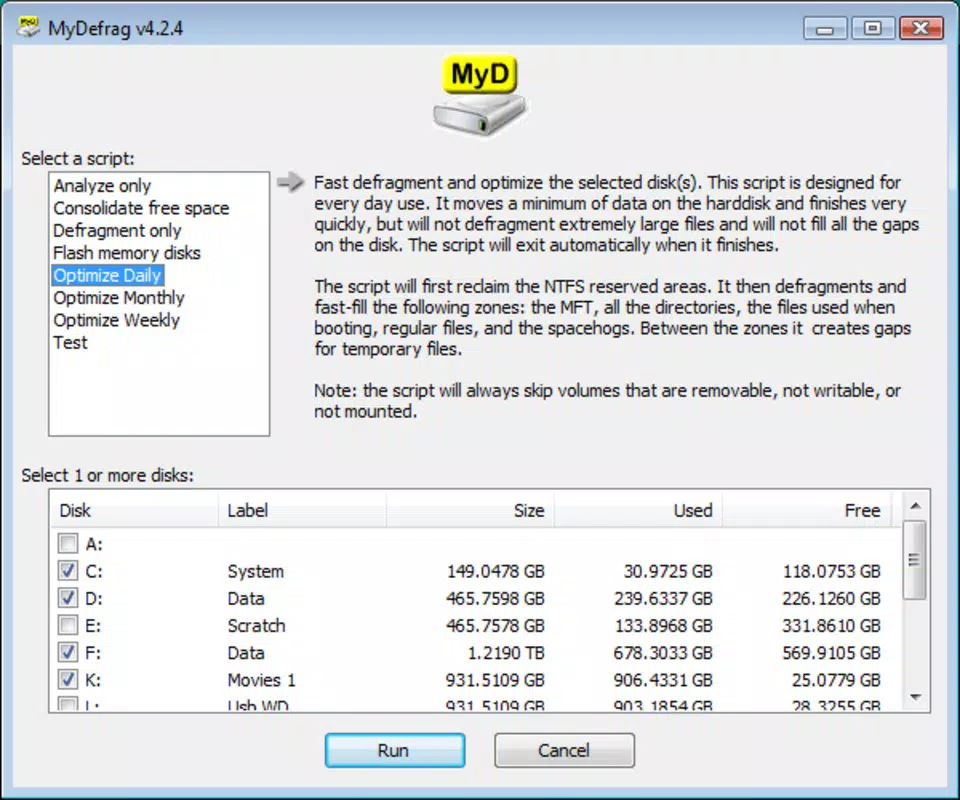
- Scheduled Maintenance: Users can configure automatic defragmentation tasks on a daily, weekly, or monthly basis. This feature enables consistent system health without requiring manual oversight, ideal for users seeking hands-off maintenance.
- Multiple Executables for Flexible Use: The tool provides three distinct versions: a standard GUI application for beginners, a command-line interface for automation and scripting, and a screensaver mode that runs defragmentation during idle periods, preserving user productivity.
- Free and User-Friendly Design: MyDefrag is available at no cost, with a straightforward interface that guides users through setup and execution. Its minimal learning curve makes it accessible to non-technical users while still offering depth for advanced users.
For example, a small office administrator could schedule weekly defragmentation of shared workstations to prevent slowdowns. An individual using an older laptop might run MyDefrag monthly to restore responsiveness. The command-line version allows system administrators to integrate defragmentation into batch scripts or automated maintenance routines.
Interface, UX & Performance
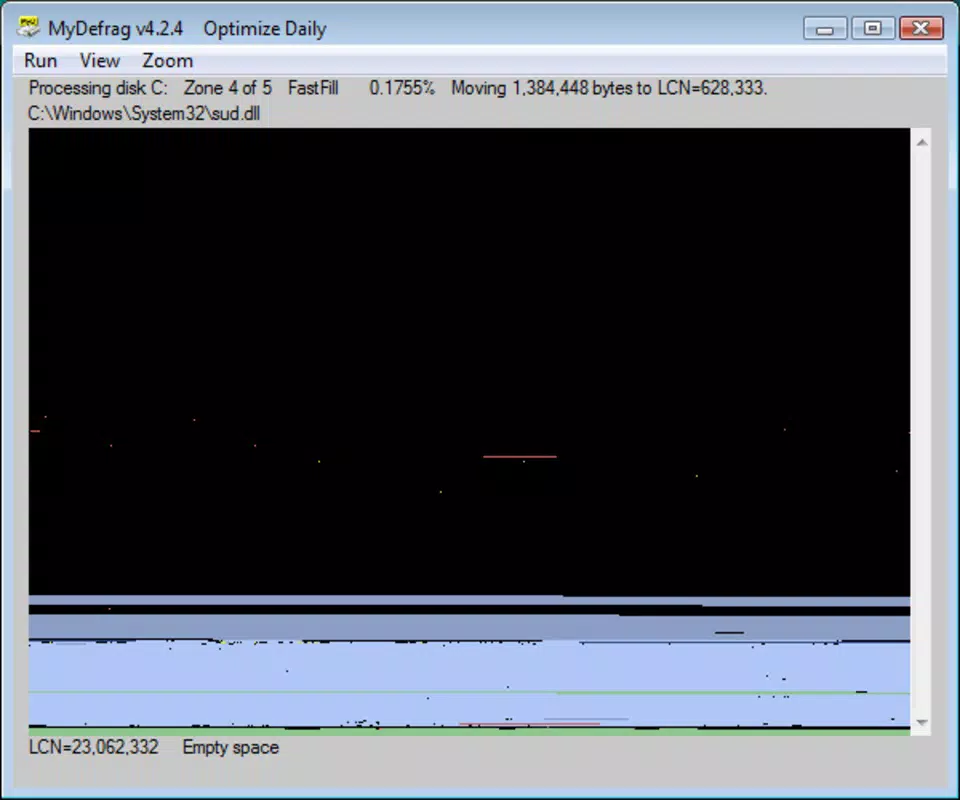
MyDefrag features a clean, minimalistic interface focused on functionality rather than visual flair. The layout centers around a simple dashboard that displays connected drives, their current fragmentation levels, and execution controls. Navigation is intuitive, with clearly labeled buttons for starting defragmentation, accessing settings, and viewing logs.
Despite its age, the application remains responsive and stable on supported Windows systems. The user experience is streamlined, with minimal delays during operation. Although the developer did not list formal performance metrics, users report noticeable improvements in disk access speed after defragmentation cycles.
Performance is consistent across various device categories, including older desktops and modern machines. The tool operates efficiently without consuming excessive system resources during execution. Responsiveness is maintained even when running in the background or during idle screensaver mode. Stability is a strong point, with no widespread reports of crashes or data corruption when used correctly.
Platform Compatibility & Technical Requirements
MyDefrag is designed exclusively for the Windows platform and is compatible with a range of Windows operating systems, though specific versions were not listed by the developer. The application has a file size of 11.6 MB, making it lightweight and quick to install. It does not require significant system resources, allowing it to run on machines with limited processing power or memory.
The developer did not specify minimum OS requirements or hardware prerequisites. However, given its release date in 2011 and continued functionality, it likely supports Windows XP and later versions. Compatibility with newer Windows 10 and 11 systems appears feasible, though users should verify functionality on their specific setup. The app does not require administrative privileges for basic operation, though full defragmentation may require elevated access.
Pros and Cons
- Completely free to download and use
- Supports a wide range of storage devices
- Offers multiple execution modes for different user needs
- Includes automated scheduling for routine maintenance
- Lightweight and stable performance
- Simple interface suitable for beginners
- Release date is from 2011; may lack modern UI elements
- No official updates since 2011; potential compatibility concerns with future Windows versions
- Developer did not provide detailed technical documentation
- Not available for mobile platforms or non-Windows systems
- Minimal visual feedback during operation
- Requires manual verification of compatibility on newer systems
FAQ
Is MyDefrag safe to use?
Yes, MyDefrag is considered safe when used on supported storage devices. It does not modify system files unless explicitly configured to do so. Users are advised to back up critical data before running defragmentation.
Can I use MyDefrag on SSDs?
While MyDefrag can technically run on SSDs, defragmentation is generally unnecessary for solid-state drives. In fact, frequent defragmentation may reduce SSD lifespan. It is recommended to disable defragmentation for SSDs unless specifically advised.
Does MyDefrag require administrator rights?
Basic operation may run without elevated privileges, but full defragmentation of system drives typically requires administrator access. The application will prompt for permission when needed.
How often should I run MyDefrag?
Users can set a schedule based on usage. A weekly or monthly run is sufficient for most systems. Heavy users may benefit from more frequent sessions, but daily defragmentation is generally not necessary.
Is MyDefrag still being updated?
The developer has not released any updates since 2011. While the tool remains functional on many systems, users should be aware that long-term support is not guaranteed, especially on future Windows versions.
Final Thoughts
MyDefrag stands as a dependable, no-cost utility for users seeking to optimize their Windows storage devices. Despite its age, its core functionality remains effective, particularly for users with older systems or those managing multiple storage types. The inclusion of scheduling, multiple execution modes, and broad device support adds significant value. While the lack of recent updates and modern design elements may deter some, its reliability and performance continue to serve a niche but important role in system maintenance.
For individuals looking to improve disk performance without spending a dime, MyDefrag offers a practical solution. It is especially useful for those who prefer automated, hands-off maintenance and need a lightweight tool that doesn’t burden system resources.
Download MyDefrag now


